
شحن لاتيس مارفل رايفلز Marvel Rivals: دليل الشحن بالمعرف UID
About Marvel Rivals
Marvel Rivals is a team shooter that puts you in squads of six, each player taking on one of Marvel's superheroes or villains, on maps whose environments break apart during the fight. Since every hero has their own costumes, players look for Lattice, the game's premium currency.
Lattice buys costumes, the battle pass and hero bundles, and you can also convert it in game into Units used for certain items. Denominations range from 100 and 500 Lattice for a single costume, to 1000 and 2180, then 5680 and 11680 for players collecting gear for several heroes in one season.
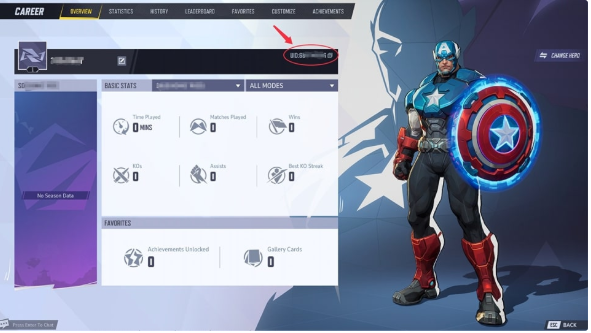
The top-up goes to the UID you find by tapping your avatar, with no password. The balance is added to the account linked to that ID, so if you play on more than one platform, make sure you copied the ID of the account you actually use, and check it before paying because a processed top-up cannot be reversed.
FAQ
What is the difference between Lattice and Units in Marvel Rivals?
Lattice is the premium currency, and it can be converted in game into Units to buy certain items.
I play on PC and console. Where does the top-up go?
It goes to the account linked to the UID you enter, so make sure it is the account you play on.
Do I need my account login details?
No, the UID alone is enough.
Can the order be changed after it is processed?
No, check the ID before paying because the top-up cannot be reversed.
Reviews
Reviews here are from customers who actually completed their order — Be the first to rate after purchase.
How to use
- Sign in to Marvel Rivals and tap your Avatar in the top-right corner of the main screen.
- Copy your UID.
- Pick the Lattice amount you need.
- Paste the ID into the Player ID field.
- Complete payment.
- The Lattice is added once the order is processed, and you can convert part of it into Units in game.